
UX vs. UI design: what's the difference and why it matters
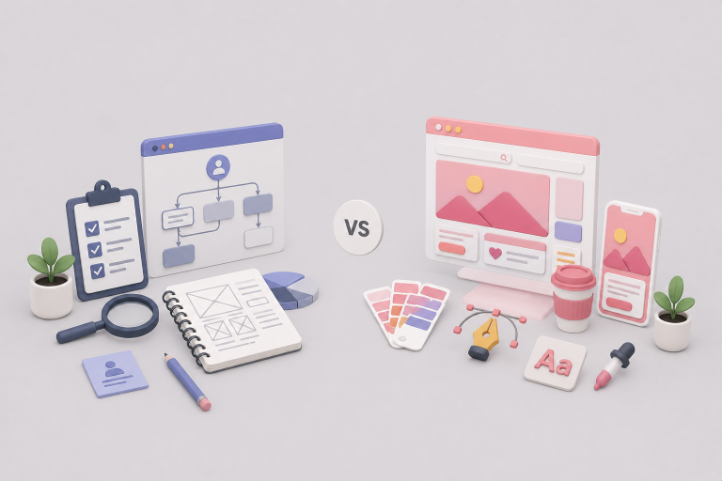
TABLE OF CONTENTS

TL;DR
- UI design (user interface) controls how your product looks and how people interact with it visually: layout, colors, buttons, and navigation.
- UX design (user experience) controls how your product works and how easily someone can accomplish a goal.
- UI is a specialized subset of UX. Good UX without polished UI feels untrustworthy. Good UI without sound UX frustrates users before they convert.
- Together, they determine whether people stay on your product, complete actions, and come back.
- 📊 The business case is real: according to the McKinsey Design Index, design-led companies outperform industry peers by up to 32% in revenue growth.
Introduction
Your website went live three months ago. Traffic is decent. But users keep dropping off before they convert. The design looks polished. You got positive feedback on the visuals. So what's going wrong?
In most cases, the answer comes down to UX/UI design, and more specifically, the gap between a product that looks good and one that actually works for the people using it.
UI (user interface) and UX (user experience) are two different things, even though you almost always hear them together. Understanding the difference matters because fixing a UX problem and fixing a UI problem require completely different approaches. Most businesses that struggle with conversion are solving the wrong one.
Here's a plain-language breakdown of what each term means, how they work together, and why both affect your bottom line.
What is UX/UI design?
UX/UI design refers to the combined practice of designing how a digital product looks (user interface) and how it works (user experience). UI focuses on visual elements: layout, color, typography, buttons, and icons. UX focuses on the overall user journey and whether those visual elements actually help users accomplish what they came to do.
The two terms are almost always paired, but they describe different responsibilities. UI is actually a specialized subset of UX. Think of UX as the architect: the person deciding how the building flows, where the rooms are, and how someone moves from the entrance to where they need to go. UI is the interior designer: choosing the furniture, the finishes, the lighting. Both have to work, or the space fails.
Most digital products need both. But they don't always fail for the same reason.
What is user interface (UI) design?
User interface design is the visual and interactive layer of a digital product. Every element a user sees and touches on a screen is part of the UI: buttons, navigation menus, typography, color palettes, icons, input fields, and page layouts.
UI designers make these elements look good and function intuitively. A well-designed UI guides users toward the right action without requiring much conscious effort. A poorly designed one confuses people, even if the underlying product is genuinely useful.
There are three types of user interface design, though most people only think of the visual kind:
- Graphical user interfaces (GUIs): The visual interfaces most of us interact with daily, from websites and mobile apps to desktop software.
- Voice-controlled interfaces (VUIs): Products you interact with through speech, like Siri, Alexa, or Google Assistant.
- Gesture-based interfaces: Interfaces controlled by physical movement, common in VR and AR devices.
When someone says a product "looks good" or "feels easy to use," they're usually responding to UI design. For more on what goes into building effective visual interfaces, see our guide to user interface design rules.
What is user experience (UX) design?
User experience design is the practice of designing products that solve a specific problem for a specific user. Where UI focuses on how things look, UX focuses on how things work and whether people can actually achieve their goals using them.
Here's a classic example from product design: the side of a door you push has no handle, because you don't need one. The side you pull has a handle, because you need something to grip. That's UX thinking applied to a physical object. Or consider the squeezable ketchup bottle that replaced the glass one. Same product. Dramatically better experience. Nobody redesigned the ketchup. They redesigned the interaction with it.
UX design in the digital world follows the same logic: design for what the user is trying to do, not just what you want them to see.
What does a UX/UI designer do?
A UX/UI designer handles both the visual design (UI) and the user experience strategy (UX) of a digital product. In practice, this means researching what users need, building wireframes and user flows, designing high-fidelity visual interfaces, and testing everything against real user behavior before and after launch.
In larger organizations, UX and UI are separate roles with separate specialists. In most startups, small product teams, and creative agencies, one person covers both. The title "UX/UI designer" or "product designer" reflects this overlap. Either structure can work well; what matters is that both disciplines get attention, not just one.
What a UI designer does day-to-day:
- Translates wireframes and prototypes into high-fidelity visual designs
- Builds and maintains design systems (color palettes, typography, button and component libraries)
- Designs interaction states: hover effects, loading states, error messages, empty states
- Works closely with developers to make sure the design is implemented accurately
What a UX designer does day-to-day:
- Conducts user research through interviews, surveys, and usability testing
- Maps user flows showing how someone moves from landing on a page to completing a goal
- Creates wireframes and low-fidelity prototypes to test ideas quickly before committing to visual design
- Analyzes behavioral data (heatmaps, click paths, conversion funnels) to find friction points
For a deeper look at what strong UX looks like in practice, our essential UX design tips cover the decisions that make the biggest difference.
Why UX/UI design matters for your business
UX/UI design directly affects whether users stay on your site, complete actions, and return. Companies that invest meaningfully in design see measurable improvements in conversion rates, customer retention, and revenue. The McKinsey Design Index found that design-led companies outperform industry-benchmark revenue growth by up to 32%. This isn't a soft benefit. It shows up in the numbers.
Here are three areas where UX/UI design has a direct business impact.
1. First impressions happen faster than you think
Research from Nielsen Norman Group shows that users form an opinion about a website in as little as 50 milliseconds. Before they read a single word of copy, they've made a judgment about whether your product looks trustworthy. That judgment comes entirely from UI: the visual design, the layout, the sense of whether this is a credible business.
A weak first impression doesn't just lose a click. It signals something untrustworthy, and most users won't give you a second chance.
2. UX determines whether users actually convert
Good-looking design can bring someone in. But if the path to conversion is unclear or frustrating, they'll leave. Baymard Institute data shows an average cart abandonment rate of nearly 70% across e-commerce, with a significant portion caused by poor UX: confusing checkout flows, unexpected costs, unclear form fields. These are UX problems masquerading as traffic problems.
Fixing UX issues in the conversion flow is often more impactful than running more ads to drive more traffic into a broken funnel.
3. Good UX builds the kind of loyalty that compounds
Acquiring a new customer costs significantly more than retaining an existing one. Bain & Company research published in Harvard Business Review found that increasing customer retention by just 5% can increase profits by 25 to 95%. UX design is one of the primary drivers of whether someone returns. If using your product is straightforward and satisfying, they'll come back. If it's confusing or frustrating, they won't, regardless of how polished the UI is.
{{LANDING_PORTFOLIO="/dev/components"}}
The principles of good UX/UI design
Good UI/UX design is built on a small set of principles that most professional designers agree on: keep users in control, reduce cognitive load, maintain consistency, and design for your users' context rather than your own assumptions. Products and websites that follow these principles feel intuitive even to first-time users.
The four golden rules of UI design
Keep users in control. Users should always know what their actions will do, and should be able to undo mistakes. This means clear feedback on every interaction, confirmation dialogs before destructive actions, and navigation that doesn't trap people in unexpected states.
Make it comfortable to use. Remove unnecessary friction. Simplify error messages. Don't make users decode jargon to complete a simple task. Comfort comes from the absence of confusion, not from the presence of features.
Reduce cognitive load. Every decision you ask a user to make costs mental effort. Break complex processes into smaller steps. Use visual hierarchy to make the important things obvious first. If your checkout flow is losing 70% of users, it's probably asking for too many decisions at once.
Keep the design consistent. Consistency lets users build a mental model of how your product works. When button styles mean the same thing throughout, when the back button is always in the same place, users learn faster. Inconsistency breaks that model and creates anxiety about what actions will do.
Best practices in UX design
Design for the user, not for yourself. The hardest discipline in UX is separating what you personally find intuitive from what your actual users find intuitive. They're almost never the same thing. User research exists precisely to close that gap.
Familiar patterns beat clever ones. Most users have interacted with a "Submit" button thousands of times. Replacing it with something unconventional might feel creative, but it introduces friction where there doesn't need to be any. In UX, familiar usually wins.
Accessibility is foundational, not optional. The Web Content Accessibility Guidelines (WCAG) exist because designing for users with disabilities consistently produces better experiences for everyone. Legible contrast ratios, keyboard navigability, and clear alt text all make products work better across the board.
Design for context. Consider when, where, and how someone will use your product. A mobile-first design approach is essential now that the majority of web traffic comes from phones, but it's deeper than screen size. Spotify, Netflix, and Uber all solve "I want something on demand" but their UX decisions are shaped by very different usage contexts: a crowded subway, a couch, a street corner at night. The context changes everything about what "easy to use" actually means.
Is UI or UX design more important?
Great UI without sound UX produces a beautiful product that fails to help users accomplish anything. Great UX without polished UI produces a functional product that nobody trusts or enjoys using. The real question is whether your product currently has a UI problem, a UX problem, or both, and that requires looking at your data rather than your design.
The intuitive answer is that UI matters more because it's what users encounter first. And that's not wrong: a visually weak UI can kill a product before the UX even gets a chance to matter. But here's the thing. If your design looks great and people still aren't converting, the problem is almost always UX. If your numbers are down, check the flows, the friction points, the places where users hesitate or abandon, before you commission a visual redesign.
Most businesses redesign their UI when they have a UX problem. It's the more visible fix, the easier thing to point to, and the more satisfying thing to launch. But it rarely solves the underlying issue.
If you genuinely had to pick one to prioritize: fix the UX first. A simple, functional experience that users can navigate is more valuable than a visually impressive product they can't figure out. Then invest in UI to make that experience feel trustworthy and polished.
Frequently asked questions about UX and UI design
Bottom line
UX and UI design solve different problems, and both matter. Weak UI means users won't give the UX a chance to matter. Broken UX means even a beautiful design won't convert. The most effective approach is to build the UX logic first (understand what your users need, then design the product around that) and invest in UI second to make the experience feel polished and trustworthy. Most businesses do this backwards, which is why so many visually impressive products still underperform.
If you're building or refreshing a website or app and need professional UI/UX design work executed quickly, ManyPixels' website design service covers everything from landing pages to full web interfaces, with first drafts delivered the next business day.

Having lived and studied in London and Berlin, I'm back in native Serbia, working remotely and writing short stories and plays in my free time. With previous experience in the nonprofit sector, I'm currently writing about the universal language of good graphic design. I make mix CDs and my playlists are almost exclusively 1960s.

Top-quality designers
A complete creative team at your fingertips: graphic and web designers, illustrators, and more.

Lightning-fast turnaround
Get start today and receive your first update on the next business day.

All-inclusive pricing
Unlimited requests and revisions. One flat monthly fee. No surprises.

Flexible & scalable model
No contract. Scale up and down as needed. Pause or cancel at anytime.
Continue reading
.jpg)
.jpg)
.avif)
Explore some of our best designs
Get inspired by a curated selection of ManyPixels work. Download the portfolio to see what our team can create.